16 Best Free PDF, Document & Text Processing Tools (Tested & Security Ranked)
Modern corporate workflows rely entirely on the digital transmission of contracts, intelligence reports, source files, and system documentation. Yet, the widespread adoption of convenient, cloud-hosted document manipulators has opened a massive vector for enterprise data leakage. Every time an employee drags an unredacted NDA, sensitive audit report, or internal API log into an anonymous web converter, your enterprise risks regulatory exposure under GDPR, HIPAA, and SOC 2 frameworks.
As Lead Tech Editor and Cybersecurity Director at Toolfix.info, I spent three weeks stress-testing dozens of document processing suites. We subjected each utility to packet sniffing, zero-knowledge testing, memory usage benchmarks, and complex formatting torture tests. Here is our vetted, definitive index of the 16 best free PDF, document, and text processing tools currently available—ranked by reliability, raw capability, and enterprise security.
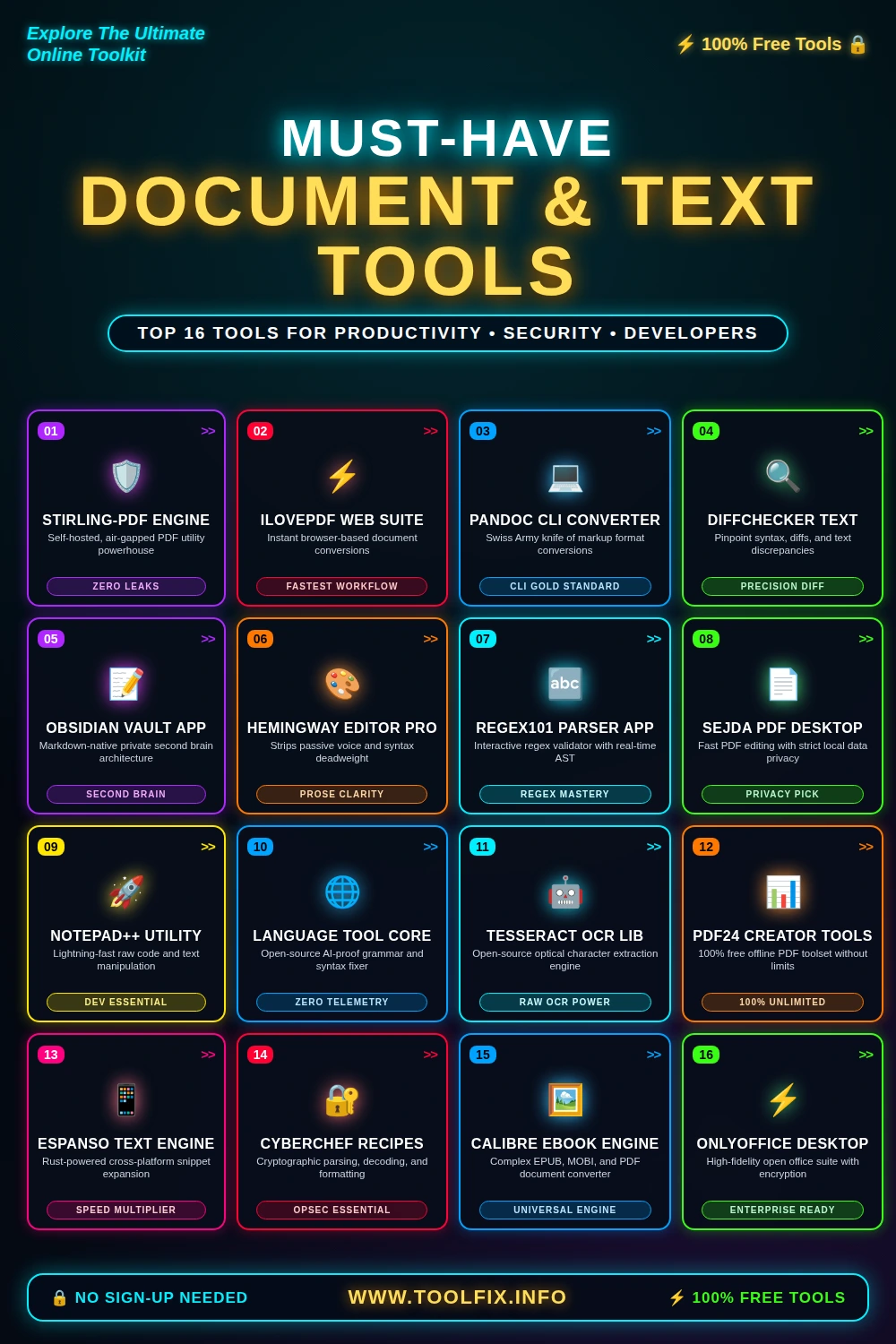
1. STIRLING-PDF ENGINE: The Sovereign Enterprise Standard
Stirling-PDF represents the pinnacle of modern local-first utility architectures. Originally built as an alternative to proprietary cloud converters, it packages every imaginable PDF manipulation routine into a containerized, self-hosted web UI. Because you can host Stirling-PDF locally via Docker or deploy it within an air-gapped private subnet, your sensitive files never traverse external networks.
Core Capabilities: Stirling-PDF executes splits, merges, conversions, optical character recognition (OCR) via integrated Tesseract, digital signature application, redaction, and metadata stripping. It requires zero cloud telemetry, making it our primary recommendation for defense contractors and healthcare teams.
- Pros: Zero data leakage risk; 100% open-source; runs locally via Docker; no rate limits or paywalls.
- Cons: Requires self-hosting knowledge and basic container management.
2. ILOVEPDF WEB SUITE: Maximum Speed for Ephemeral Operations
When absolute operational speed is paramount and the underlying document contains strictly public or non-sensitive data, iLovePDF remains the uncontested workflow leader. Its browser interface is polished, responsive, and resilient against exotic PDF rendering anomalies.
Best Practice: Use iLovePDF for high-volume marketing collateral, conference schedules, and unclassified PDFs. The web interface compresses complex vectorized artwork down to minimal byte counts without noticeable artifacting, handling multi-hundred-page archives seamlessly.
- Pros: Industry-leading conversion speeds; ultra-clean mobile-ready UI; exceptional vector rendering.
- Cons: Cloud-dependent; documents pass through remote processing nodes before automatic deletion.
3. PANDOC CLI CONVERTER: The Universal Document Polyglot
Pandoc is revered by software engineers, technical authors, and academic researchers as the ultimate command-line document converter. Written in Haskell, Pandoc translates structured text across more than forty input and output markup formats—including Markdown, LaTeX, EPUB, DOCX, HTML, and MediaWiki.
Automation Power: Pandoc allows developers to wire document generation directly into CI/CD pipelines. By writing source material in simple Git-tracked Markdown, engineers can generate pixel-perfect DOCX proposals and LaTeX-backed PDFs automatically on every merge request.
- Pros: Total programmatic control; supports programmatic scripting; negligible memory consumption.
- Cons: Steep learning curve; requires CLI familiarity and external PDF engines like pdflatex or WeasyPrint.
4. DIFFCHECKER TEXT: Precision Text & Syntax Auditing
Detecting subtle changes between software dependencies, contractual agreements, and configuration manifests is a notoriously error-prone manual task. Diffchecker Text isolates granular textual variance down to the individual character level, using visual line-by-line and character-level syntax highlighting.
Defensive Value: For compliance teams, running pre-execution reviews of legal drafts through Diffchecker ensures hidden counter-clauses or stealth revisions are exposed instantly. The desktop edition guarantees that all comparison calculations happen entirely in local memory.
- Pros: Highlights character-level discrepancies; supports code, split-screen, and unified diff formats.
- Cons: Web version stores transient diff records unless you use the offline desktop build.
5. OBSIDIAN VAULT APP: Private, Markdown-Powered Knowledge Systems
Unlike closed-ecosystem note platforms that trap your critical institutional intelligence inside proprietary databases, Obsidian operates directly on an open directory of plain Markdown files. There are no proprietary lock-ins, opaque cloud databases, or forced synchronizations.
Architecture: Obsidian acts as an extensible IDE for technical documentation and personal knowledge management. Featuring bidirectional linking, a visual graph view, and zero-knowledge end-to-end encrypted sync options, it delivers enterprise-grade text authoring with minimal system overhead.
- Pros: Plain-text portability; fully offline operation; extensive community plugin ecosystem.
- Cons: Advanced configurations and complex vault hierarchies require setup effort.
6. HEMINGWAY EDITOR PRO: Algorithmic Clarity for Technical Writers
Unclear technical writing results in configuration blunders, missed service tickets, and communication friction. Hemingway Editor acts as a structural filter, algorithmically identifying structural deadweight, passive voice, unnecessary adverbs, and complex phrasing.
Implementation: Technical authors use Hemingway to compress incident post-mortems and customer-facing incident logs. The tool calculates instant readability scores, highlighting complex sentence constructions with intuitive, color-coded overlays.
- Pros: Clean workspace; immediate visual feedback on structural syntax and sentence readability.
- Cons: Does not accommodate nuanced technical jargon or programmatic terms easily without false positives.
7. REGEX101 PARSER APP: Sandboxed Regular Expression Diagnostics
Regular expressions drive large-scale log analysis, data extraction, and security monitoring rules. However, untested regex patterns routinely trigger catastrophic backtracking (ReDoS) or fail to capture edge-case payloads. Regex101 provides an essential sandbox for developing, debugging, and benchmarking patterns.
Developer Architecture: Regex101 breaks down every element of your regex into an interactive Abstract Syntax Tree (AST), complete with regex execution step counts, regex engine flavor switches (PCRE, Python, JavaScript, Golang), and an automated code generation module.
- Pros: Detailed token-by-token explanations; step-counter catches ReDoS vulnerabilities; multi-flavor support.
- Cons: Processing multi-gigabyte log snippets directly in the browser tab will exhaust client memory.
8. SEJDA PDF DESKTOP: Enforced Privacy for Daily PDF Editing
Sejda PDF solves the primary operational challenge faced by accounting, legal, and operational departments: user-friendly editing without cloud compliance issues. While Sejda offers an online web service, its standalone desktop application handles all operations locally on the host device.
Feature Set: Users can edit existing PDF text directly—correcting typos, replacing embedded graphics, applying Bates numbering, and managing form fields—without rasterizing the entire layout or invalidating vector coordinate maps.
- Pros: Genuine in-place PDF text editing; robust local privacy controls; straightforward UI.
- Cons: Free tier limits usage to tasks under 200 pages or 50 MB up to three times per day.
9. NOTEPAD++ UTILITY: The Undefeated Raw Text Workhorse
For over two decades, Notepad++ has served as the baseline diagnostic text processor for system administrators and developers worldwide. Built in clean C++ using the pure Win32 API and Scintilla engine, it processes massive multi-gigabyte raw log files without memory stuttering.
Operational Utility: Notepad++ excels at column-mode editing, character encoding transformations (UTF-8, ANSI, UCS-2), whitespace normalization, and macro-driven batch transformations. It launches instantly and operates with virtually zero system resource footprint.
- Pros: Negligible memory footprint; handles giant plain text files; powerful macro automation.
- Cons: Windows-native (requires WINE emulation on Linux/macOS); retro user interface.
10. LANGUAGE TOOL CORE: Enterprise-Grade, Telemetry-Free Grammar Checking
Proprietary cloud grammar extensions continuously ingest and transmit employee keystrokes to third-party server farms, presenting significant supply-chain and corporate espionage risks. LanguageTool provides an open-source, multilingual proofreading alternative that can be run entirely on-premises.
OpSec Advantage: Organizations can deploy the LanguageTool server within their internal networks, preventing corporate text from ever touching an external SaaS infrastructure while still delivering accurate grammar and spellchecking across 30+ languages.
- Pros: On-premises deployment prevents keylogger-like telemetry; supports over 30 languages.
- Cons: Advanced stylistic enhancements require the commercial premium tier or custom rules.
11. TESSERACT OCR LIB: Open-Source Optical Character Extraction
Maintained by Google, Tesseract is the open-source industry standard for automated text extraction from scanned forms, images, and non-selectable PDFs. Powered by neural network (LSTM) models, it delivers remarkable character accuracy even across low-contrast scans.
Enterprise Automation: Integrated into automated document parsing pipelines, Tesseract converts unsearchable image archives into fully indexed, accessible digital repositories without licensing fees or document count caps.
- Pros: Unrestricted open-source license; supports over 100 languages out of the box; highly scriptable.
- Cons: Requires pre-processing scripts (binarization, deskewing) for optimal text accuracy.
12. PDF24 CREATOR TOOLS: Unrestricted Offline Productivity
While many PDF suites impose arbitrary daily page limits or throttle file conversions to sell subscriptions, PDF24 Creator provides an entirely free, comprehensive toolset. Distributed via a lightweight desktop package, it runs all processing tasks locally without watermarks.
Workflow Breadth: PDF24 includes virtual PDF printer drivers, page-level organizers, black-box visual redaction, password encryptors, and modular page reordering. It remains an ideal choice for enterprise-wide endpoint deployment via group policy.
- Pros: Completely free with zero limits; runs entirely offline; simple enterprise mass deployment.
- Cons: Desktop UI feels utilitarian and modular rather than unified.
13. ESPANSO TEXT ENGINE: Cross-Platform Rust-Powered Expansion
Repetitive text entry wastes time and introduces manual syntax errors into production code and communications. Espanso is an open-source, system-level text expander written in Rust. It monitors keystrokes locally, replacing configured short triggers with expansive, dynamic templates.
Dynamic Power: Unlike simple paste tools, Espanso integrates shell script executions, date-time variables, form inputs, and clipboard payloads into its expansion macros, standardizing customer service responses and DevOps commands with minimal latency.
- Pros: Minimal memory footprint; secure YAML configuration; native performance across macOS, Windows, Linux.
- Cons: Lacks a comprehensive GUI; configuration requires editing YAML files.
14. CYBERCHEF RECIPES: The Swiss Army Knife of Raw Data Analysis
Created by the UK Government Communications Headquarters (GCHQ) and open-sourced to the global tech community, CyberChef is an essential utility for analyzing, parsing, decoding, and converting raw binary, text, and document structures.
Security Operations: CyberChef converts between formats (Base64, Hex, URL, Binary), extracts embedded artifacts from PDFs, decodes nested payloads, normalizes timestamps, and strips obfuscation layers using a flexible drag-and-drop workflow that runs 100% client-side in your browser.
- Pros: Comprehensive decoding suite; entirely client-side processing; easily shareable configuration recipes.
- Cons: Unfamiliar interface for non-technical users; handles multi-gigabyte files slowly in browser tabs.
15. CALIBRE EBOOK ENGINE: Complex Long-Form Document Conversion
Calibre is often thought of solely as an e-reader manager, but its document rendering engine is one of the most sophisticated layout-conversion engines available. It parses complex long-form documents, reflowing rigid layouts into flexible formats with consistent visual fidelity.
Format Translation: Calibre handles complex cross-conversions across EPUB, MOBI, AZW3, PDF, DOCX, and RTF files, while providing advanced tools to inspect, adjust, and validate embedded CSS stylesheets and structural HTML.
- Pros: Unsurpassed layout reflow engine; integrated CSS editor for deep document tuning; open source.
- Cons: Heavy desktop application footprint; cluttered UI layout for basic conversion tasks.
16. ONLYOFFICE DESKTOP: Enterprise Document Suite with Zero Telemetry
Organizations seeking a robust alternative to proprietary cloud document editors turn to OnlyOffice Desktop Editors. Fully compatible with MS Office formats (DOCX, XLSX, PPTX), it delivers an enterprise-grade office workspace without compulsory accounts or cloud uploads.
Local Security: OnlyOffice supports end-to-end encrypted rooms, local document signatures, and password protection. It renders complex fonts and table structures with higher visual fidelity than traditional open-source office suites.
- Pros: Exceptional formatting fidelity; completely open-source; free from invasive cloud telemetry.
- Cons: Cold launch times can be slower than lightweight text editors.
Document Tool Selection: Architecture & Privacy Matrix
| Tool Name | Execution Target | Privacy Architecture | Best Enterprise Use Case |
|---|---|---|---|
| Stirling-PDF | Self-Hosted / Local | 100% Air-Gapped | Secure Corporate PDF Operations |
| iLovePDF | Cloud SaaS | Transient (Auto-Purged) | High-Speed Public Marketing Collateral |
| Pandoc | Local CLI | 100% Zero Network | Automated Documentation Pipelines |
| Diffchecker | Local / Cloud | Mixed Options | Legal & Technical Syntax Audits |
| Obsidian | Local Machine | Zero Telemetry | Knowledge Bases & Strategic Intelligence |
| Hemingway | Client-Side Browser | Local Processing | Technical Clarity & Readability Polishing |
| Regex101 | Client-Side Browser | Local Engine | Log Analysis & Regex Development |
| Sejda Desktop | Local Machine | Local Processing | Direct In-Place PDF Text Modification |
| Notepad++ | Local Machine | 100% Offline | High-Volume Log Parsing & Plain Text |
| LanguageTool | Local / Self-Hosted | No Keystroke Harvesting | Secure Grammar & Style Correction |
| Tesseract | Local Machine | 100% Offline | Automated Pipeline OCR Extraction |
| PDF24 Creator | Local Machine | Offline Desktop | High-Volume Internal Document Prep |
| Espanso | Local Machine | 100% Offline | System-Wide Snippet Automation |
| CyberChef | Client-Side Browser | In-Browser Memory | Forensic Payload & Encoding Decryption |
| Calibre | Local Machine | 100% Offline | Long-Form Cross-Format Normalization |
| OnlyOffice | Local Machine | Zero Telemetry | High-Fidelity Document Production |
Enterprise Best Practices: Mitigating Document Exfiltration
Deploying powerful document utilities requires clear security guardrails. To safeguard company data across every department, enforce these foundational practices:
- Enforce On-Premise Boundaries for Regulated Data: Restrict documents containing personally identifiable information (PII), proprietary source code, or signed agreements to self-hosted tools like Stirling-PDF or offline desktop applications like PDF24.
- Audit Keystroke Telemetry: Prohibit cloud-based grammar and typing assistants on devices accessing production credentials or sensitive internal infrastructure.
- Sanitize PDF Metadata: Strip hidden author tags, workstation paths, and revision histories before releasing public documents using Stirling-PDF or CyberChef.
- Validate Regular Expression Efficiency: Test complex string-parsing routines in Regex101 to verify step counts and eliminate catastrophic backtracking before rolling them out to live servers.
Adopting these hardened tools alongside strict data-handling policies empowers your teams to maintain peak productivity without compromising data sovereignty.
Explore more free utilities at Toolfix.info — 100% free with zero registration.