16 Essential Cyber Security & Privacy Tools for Online Anonymity
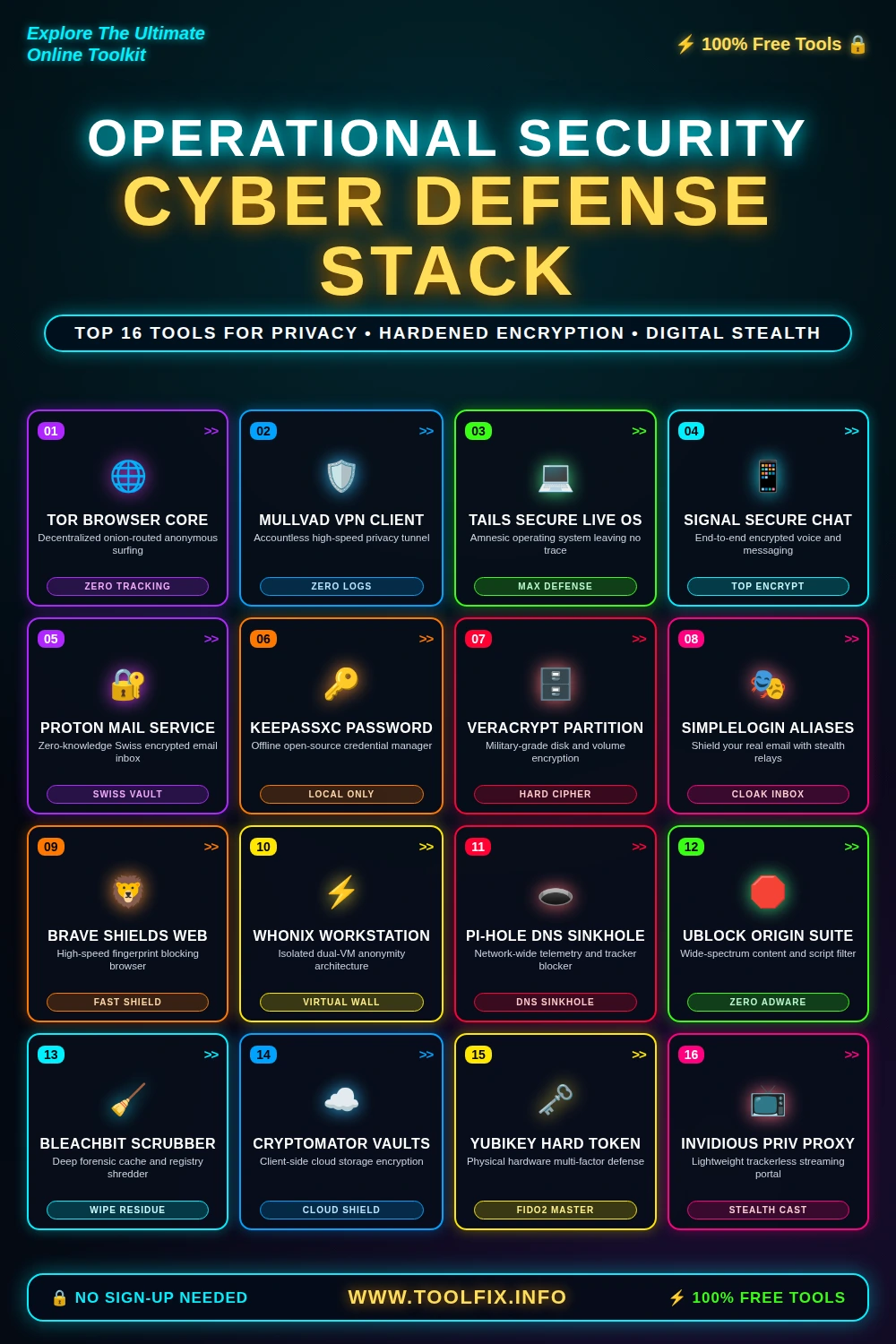
In an era defined by aggressive biometric harvesting, pervasive ISP telemetry, state-level surveillance networks, and persistent hardware fingerprinting, genuine digital privacy is no longer a passive state. It is an active engineering discipline. True online anonymity requires an uncompromising defense-in-depth architecture spanning transport security, endpoint hygiene, storage isolation, and identity cloaking.
The Foundations of Threat Modeling and Operational Security (OpSec)
Before deploying defensive tooling, security engineers establish a rigorous threat model. Are you seeking protection against commercial behavioral profiling and commercial data brokers, or are you defending critical intellectual property, journalistic sources, and communications against nation-state adversaries? No single application provides a magic cloaking device. Instead, privacy is achieved by chaining audited, non-proprietary utilities together to eliminate single points of failure.
1. TOR BROWSER CORE — Decentralized Multi-Hop Anonymity
The Tor Browser remains the definitive reference standard for anonymous web traversal. Built on a modified Firefox ESR base, it routes your encrypted traffic across three independent volunteer nodes: Guard, Middle, and Exit. Each node unpeels a single layer of cryptographic routing metadata, guaranteeing that no single hop knows both the origin IP and the destination web server.
Beyond traffic routing, Tor Browser enforces uniform fingerprint resistance: viewport sizes are rounded to standardized letterboxes, canvas inspection is neutralized, and cryptographic clocks are synchronized to mitigate cross-site execution tracking.
Pros
- Eliminates ISP destination logging
- Resilient against hardware fingerprinting
- Native access to authenticated .onion services
Cons
- Noticeable latency overhead
- Exit node IP blocks by aggressive CDNs
2. MULLVAD VPN CLIENT — Identityless WireGuard Tunneling
While Tor excels at interactive browsing, high-throughput network protection requires a rigorously audited, leak-free VPN. Sweden-based Mullvad operates on a radical privacy premise: you do not provide an email address, username, or phone number. Accounts are randomly generated 16-digit cryptographic tokens, payable via cash or non-custodial cryptocurrency.
Mullvad’s native client incorporates strict firewall-level kill switches, quantum-resistant WireGuard tunnels, custom DNS routing with tracker blocking, and continuous multi-hop exit configurations across bare-metal server infrastructure.
Pros
- Zero identity association at account creation
- Audited RAM-only server nodes
- Strict system-level IPv6 leak prevention
Cons
- No port-forwarding support
- Fixed pricing structure without multi-year discounts
3. TAILS SECURE LIVE OS — The Ephemeral Amnesic Environment
Tails (The Amnesic Incognito Live System) is a portable Debian-derived operating system engineered to execute entirely from system RAM. When booting from a read-only USB device, every network packet generated by any application is cryptographically forced through the Tor network. Non-Tor connections are blocked at the kernel packet filter level.
Upon physical shutdown or device extraction, the system automatically overwrites volatile memory, ensuring zero persistent artifacts remain on the host machine’s solid-state drives or NVMe storage controllers.
Pros
- Leaves zero forensic residue on host hardware
- Default system-wide kernel routing through Tor
- Pre-bundled with cryptographic toolkits
Cons
- Requires full hardware reboot to launch
- Hardware driver incompatibilities with bleeding-edge GPUs
4. SIGNAL SECURE CHAT — Gold Standard Cryptographic Messaging
Signal’s double ratchet protocol combines the extended Triple Diffie-Hellman (X3DH) key agreement with symmetric-key ratchets to guarantee perfect forward secrecy and break-in recovery. Unlike enterprise chat platforms, Signal retains virtually no metadata: their infrastructure stores solely the unix epoch timestamp of account creation and the last connection date.
With sealed sender technology, the server cannot ascertain who is transmitting messages to whom, decoupling communication payloads from transport identity.
Pros
- Peer-reviewed open source protocol
- Zero storage of communication metadata
- Encrypted local backups and disappearing messages
Cons
- Requires mobile phone number for initial registration
- Desktop client requires pairing with smartphone
5. PROTON MAIL SERVICE — Zero-Access Swiss Message Storage
Traditional email providers index your inbox content to feed predictive text algorithms and programmatic ad bidding. Proton Mail neutralizes this vulnerability through automated client-side asymmetric public key encryption. Inbound emails from external servers are instantly encrypted using the recipient’s public PGP key before touching database drives.
Proton servers retain zero knowledge of user decryption private keys, rendering arbitrary subpoena requests and database breaches useless against your correspondence archives.
Pros
- End-to-end PGP integration made transparent
- Governed by strict Swiss privacy statutes
- Zero access to inbox plaintext by system admins
Cons
- Email header metadata remains unencrypted by protocol design
- Search functionality over message bodies requires client indexing
6. KEEPASSXC PASSWORD — Air-Gapped Local Credential Sovereignty
Cloud-based password vaults introduce external blast radiuses—if an enterprise cloud sync provider suffers a breach, your encrypted vault is exposed to offline hash attacks. KeePassXC eliminates cloud risk by operating entirely offline. Your credentials reside in an encrypted .kdbx file secured with ChaCha20, Twofish, or AES-256 ciphers, hardened via Argon2 key derivation.
You maintain singular custody of the database file, controlling storage location across encrypted flash drives, offline backup targets, or air-gapped workstations.
Pros
- No central cloud server or third-party exposure
- Built-in TOTP authenticator and SSH key agent
- Native cross-platform execution on Linux, macOS, and Windows
Cons
- User assumes full responsibility for backup replication
- Manual cross-device synchronization overhead
7. VERACRYPT PARTITION — Forensic-Grade Container Encryption
VeraCrypt is the open-source spiritual successor to TrueCrypt, providing hardened real-time disk encryption. It can encrypt full physical drives, partitions, or virtual file containers utilizing cascaded ciphers such as AES-Twofish-Serpent. It features plausible deniability through hidden volumes: secondary encrypted partitions embedded within the free space of a primary outer volume.
Under forensic scrutiny, a properly generated hidden volume contains purely random pseudorandom bits, making it mathematically impossible to prove its existence without the correct cryptographic passphrase.
Pros
- Plausible deniability with hidden operating systems
- Cascaded multi-cipher encryption support
- Independent audits validating cryptographic implementations
Cons
- Improper volume dismounting risks filesystem corruption
- Complex setup for novice desktop operators
8. SIMPLELOGIN ALIASES — Defense Against Entity Correlation
Your primary email address is your digital social security number. When reused across ecommerce, newsletters, and forums, commercial aggregators correlate disparate footprints into unified tracking dossiers. SimpleLogin breaks this correlation by provisioning on-the-fly forwarding aliases.
Every platform receives an isolated, unique alias. Inbound communications are signed and forwarded to your primary inbox, while responses are routed through SimpleLogin’s reverse aliases, obscuring your actual endpoint address.
Pros
- Instantly isolates and severs breach leaks
- PGP encryption forwarding support
- Supports custom domain name integration
Cons
- Central relay must be trusted with transit integrity
- Aggressive domain blacklists occasionally flag alias providers
9. BRAVE SHIELDS WEB — High-Performance Fingerprint Scrambling
While Tor is essential for maximum anonymity, high-bandwidth daily workloads often necessitate Chromium rendering engine parity. Brave Shields delivers advanced protection by default, scrambling device canvas parameters, audio context metrics, and WebGL APIs per-session.
Its native ad and tracker filtering engine is written in Rust, inspecting network requests at the engine pipeline level before execution, outperforming script-based extensions in speed and memory utilization.
Pros
- Far superior performance to browser extensions
- Dynamic canvas and audio fingerprint randomization
- Built-in IPFS node and Tor window integration
Cons
- Bundled crypto-token services require manual opt-out
- Underlying Chromium core contributes to monoculture dominance
10. WHONIX WORKSTATION — Dual-VM Network Hardware Isolation
When operating in hostile environments, software exploits executing inside a browser can execute arbitrary shellcode to query the physical network interface, exposing your real hardware MAC and external ISP IP address. Whonix neutralizes this entire attack surface through a two-tier virtualized architecture: the Whonix-Gateway and the Whonix-Workstation.
The workstation VM housing the browser possesses no virtual network interface connected to the host router. It communicates exclusively through an internal host-only subnet bound to the gateway VM, which cryptographically Torifies all ingress and egress packets. Even with root privilege escalation, an attacker cannot extract your real IP address.
Pros
- Total immunity against user-space IP discovery exploits
- Cross-platform hypervisor support (KVM, VirtualBox, Qubes)
- Seamless system-wide identity rotation
Cons
- Demands notable physical RAM and CPU allocation
- Requires baseline hypervisor configuration familiarity
11. PI-HOLE DNS SINKHOLE — Perimeter-Wide Telemetry Interception
Smart TVs, IoT devices, mobile operating systems, and proprietary applications constantly emit diagnostic beacons back to parent surveillance clouds. Pi-hole acts as an internal DNS sinkhole server that intercepts, inspects, and blocks domain resolution requests across your local area network.
By pairing Pi-hole with recursive Unbound DNS resolution, you completely decouple your local network from commercial upstream DNS providers, eliminating third-party DNS logging and caching records directly on your internal hardware.
Pros
- Network-wide protection without installing software on endpoints
- Significant reduction in device telemetry and ad bandwidth
- Comprehensive visibility into LAN domain resolution behavior
Cons
- Inoperative when devices route outside local Wi-Fi without VPN setup
- Aggressive blocklists may break complex corporate portals
12. UBLOCK ORIGIN SUITE — Wide-Spectrum Browser Request Filtering
Authored by Raymond Hill, uBlock Origin is an indispensable dynamic request filtering tool. Unlike superficial ad blockers, uBlock Origin evaluates incoming web documents against complex procedural syntax rules, intercepting inline scripts, CNAME cloaking redirects, web beacons, and hidden iframe elements.
Utilizing medium or hard mode, users can disable third-party JavaScript by default, fundamentally shrinking browser exploit attack surfaces down to static HTML and CSS parsing.
Pros
- Negligible memory and processor footprint
- Neutralizes indirect CNAME tracker evasion methods
- Granular point-and-click dynamic rule matrix
Cons
- Advanced rulesets require user troubleshooting for broken sites
- Restricted capabilities on Manifest V3-enforced Chromium platforms
13. BLEACHBIT SCRUBBER — Antiforensic Local Data Shredding
Standard OS file deletion merely unlinks inode pointers from the filesystem table; the underlying binary clusters remain intact on storage platters until overwritten. BleachBit performs automated cryptographic file shredding, overwriting target disk sectors with pseudorandom passes to prevent recovery.
It systematically vacuums SQLite database indexes, purges temporary application caches, scrubs system swap files, and clears residual crash dumps across dozens of desktop distributions.
Pros
- Fully open-source and auditable code base
- Deep cleaning algorithms for common developer and browser suites
- Overwrites unallocated disk space to neutralize recovery tooling
Cons
- Excessive write operations can accelerate consumer SSD wear
- Accidental selection of system components requires careful attention
14. CRYPTOMATOR VAULTS — Zero-Knowledge Multi-Cloud Layer
Mainstream cloud storage utilities (Google Drive, Dropbox, OneDrive) synchronize data in unencrypted formats or retain server-side keys. Cryptomator bridges commercial convenience and absolute cryptographic privacy by applying client-side AES-256 encryption before files leave your endpoint device.
Each file is encrypted individually, ensuring changes to a 5MB text document within a 100GB vault do not necessitate re-uploading the entire container. File names and directory hierarchies are obscured, presenting the cloud host with opaque binary ciphertext.
Pros
- Agnostic of cloud storage vendor
- Granular file-by-file synchronization design
- Open-source implementation audited by independent cryptographers
Cons
- File size and modification timestamps remain visible
- Mobile client applications require separate licenses
15. YUBIKEY HARD TOKEN — Physical Hardware Authentication Enclave
SMS and software-based TOTP codes are vulnerable to SIM swapping, session hijacking, and reverse-proxy phishing kits (e.g., Evilginx). YubiKey utilizes FIDO2/WebAuthn public-key cryptography to bind authentication directly to the exact DNS domain visited in the browser window.
Even if an operator is tricked into entering credentials on an authentic-looking fraudulent domain, the physical secure element detects the origin mismatch and refuses to sign the cryptographic challenge, completely thwarting account takeovers.
Pros
- Mathematically immune to credential phishing proxies
- Waterproof, crushproof physical secure element hardware
- Houses PGP, SSH, and WebAuthn credentials natively
Cons
- Loss of unbacked hardware tokens can lead to lockouts
- Upfront hardware acquisition investment
16. INVIDIOUS PRIV PROXY — Trackerless Surveillance-Free Streaming
Modern video streaming platforms maintain deep behavioral graphs, tracking pause timings, cursor trajectories, watch history correlations, and IP network links. Invidious acts as an open-source alternative front-end to YouTube that routes streaming traffic through proxy servers without running telemetry scripts.
It allows subscription tracking, audio extraction, and media consumption without an account, completely isolating your device from identity-tracking algorithms and targeted behavioral feedback loops.
Pros
- Zero proprietary JavaScript or tracking pixels executed
- Accountless channel subscriptions exportable via JSON
- Supports self-hosting on private VPS infrastructure
Cons
- Public instances occasionally suffer rate-limiting from host CDNs
- High-resolution playback can intermittently drop packets
Constructing Your Operational Privacy Workflow
True operational resilience relies on intentional separation of concerns. To achieve a zero-leak threat defense profile, combine these tools systematically into layered security zones:
- Perimeter Layer: Route local network traffic through a Pi-hole instance paired with an audited Mullvad VPN connection active at the router or endpoint level.
- Data Sovereignty Layer: Maintain credentials exclusively in an offline KeePassXC database secured with a YubiKey, while encrypting remote cloud assets with Cryptomator.
- Identity Cloaking Layer: Segment email communications using SimpleLogin relays mapped to Proton Mail, and restrict critical communications to Signal.
- High-Assurance Execution Layer: For high-risk browsing, launch a dedicated Whonix VM or deploy a fresh Tails OS live instance to guarantee zero trace persistence.
By enforcing this systematic pipeline, you eliminate reliance on corporate trust promises and establish quantifiable, cryptographically verifiable privacy across your entire digital existence.
Explore more free utilities at Toolfix.info — 100% free with zero registration.